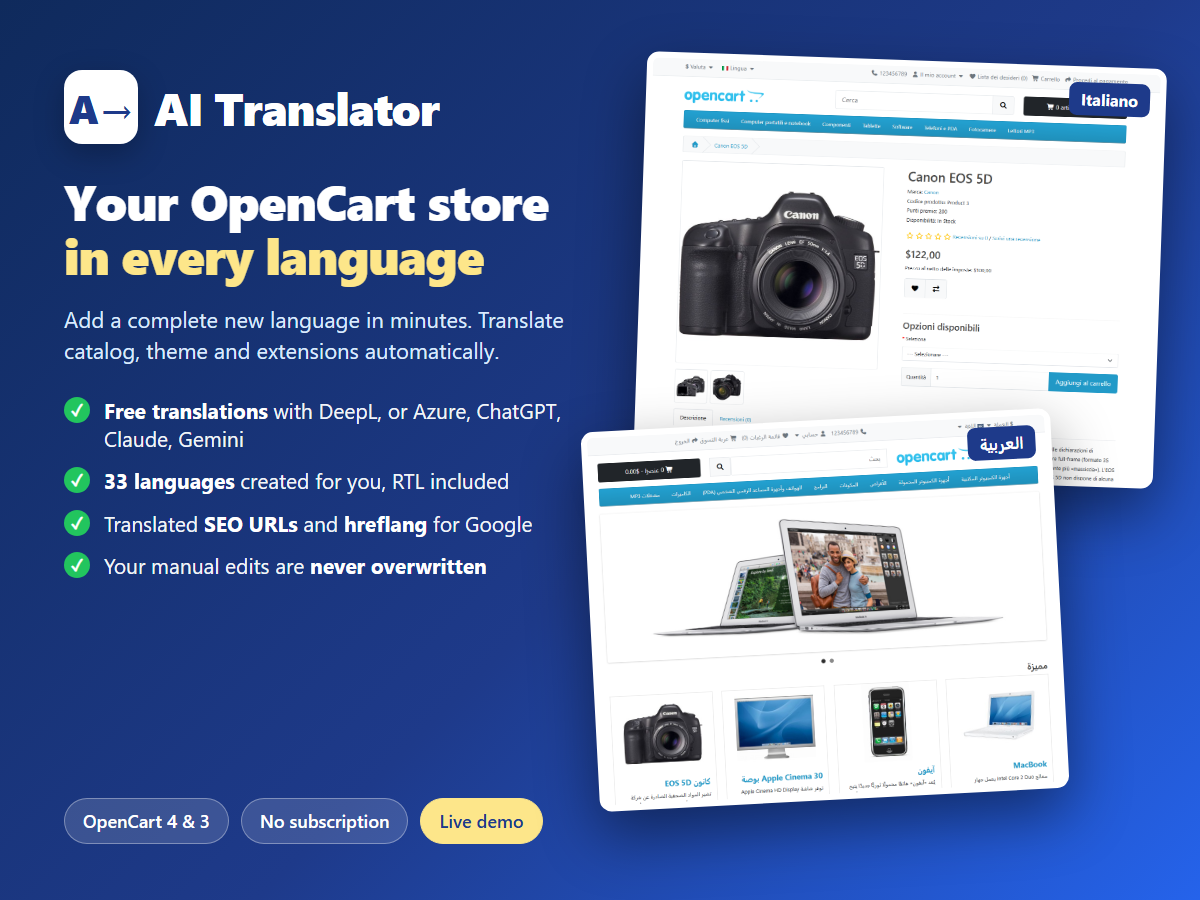
See it in 90 seconds
Requirements
- OpenCart 4.0.2.0 - 4.1.x with PHP 8.0 or later, or OpenCart 3.0.2.0 - 3.0.x with PHP 7.4 or later.
- The PHP extensions cURL and GD (present on almost every hosting).
- An API key from one translation provider (see Get an API key).
- To add new languages: write permission on
extension/ai_translator(OpenCart 4), or oncatalog/languageandadmin/language(OpenCart 3). The module checks it and tells you if it is missing. - Linux and Windows hosting are both supported.
Installation
The download contains one package for each OpenCart version. Upload only the file for your version and do not unzip it.
OpenCart 4
- Admin > Extensions > Installer > Upload
opencart-4.x/ai_translator.ocmod.zip. - In the list below the upload button, click the green Install button next to AI Translator.
- Admin > Extensions > Extensions > Modules > AI Translator > Install (green +), then Edit (blue pencil).
OpenCart 3
- Admin > Extensions > Installer > Upload
opencart-3.x/ai_translator.ocmod.zip. - Admin > Extensions > Extensions > Modules > AI Translator > Install (green +), then Edit (blue pencil).
AI Translator is also in the menu Catalog > AI Translator. The Guided tour button walks you through every feature in two minutes.
Get an API key
You use your own key: texts go straight from your server to the provider, never through us. Choose the provider in Settings, paste the key and press Test connection.
DeepL (2 minutes)
- Open deepl.com/pro-api, open the API tab and choose the free Developer plan.
- Create the account.
- Open API Keys, copy the key and paste it in Settings > DeepL API key.
The Developer plan includes 1 million characters: enough for about 15 store interfaces (about 60,000 characters each), or one interface plus 400 - 600 complete products. Older "DeepL API Free" keys keep 500,000 characters per month. The counter at the top of the module shows your usage.
Microsoft Azure Translator
- In the Azure portal create a Translator resource and choose the free F0 pricing tier.
- Open Keys and Endpoint, copy Key 1 and the Location/Region (for example
westeurope) into Settings.
OpenAI, Anthropic Claude, Google Gemini
- OpenAI: platform.openai.com/api-keys
- Anthropic Claude: console.anthropic.com
- Google Gemini: aistudio.google.com/apikey
With these providers you can write instructions (tone, formal or informal, audience) and choose the model.
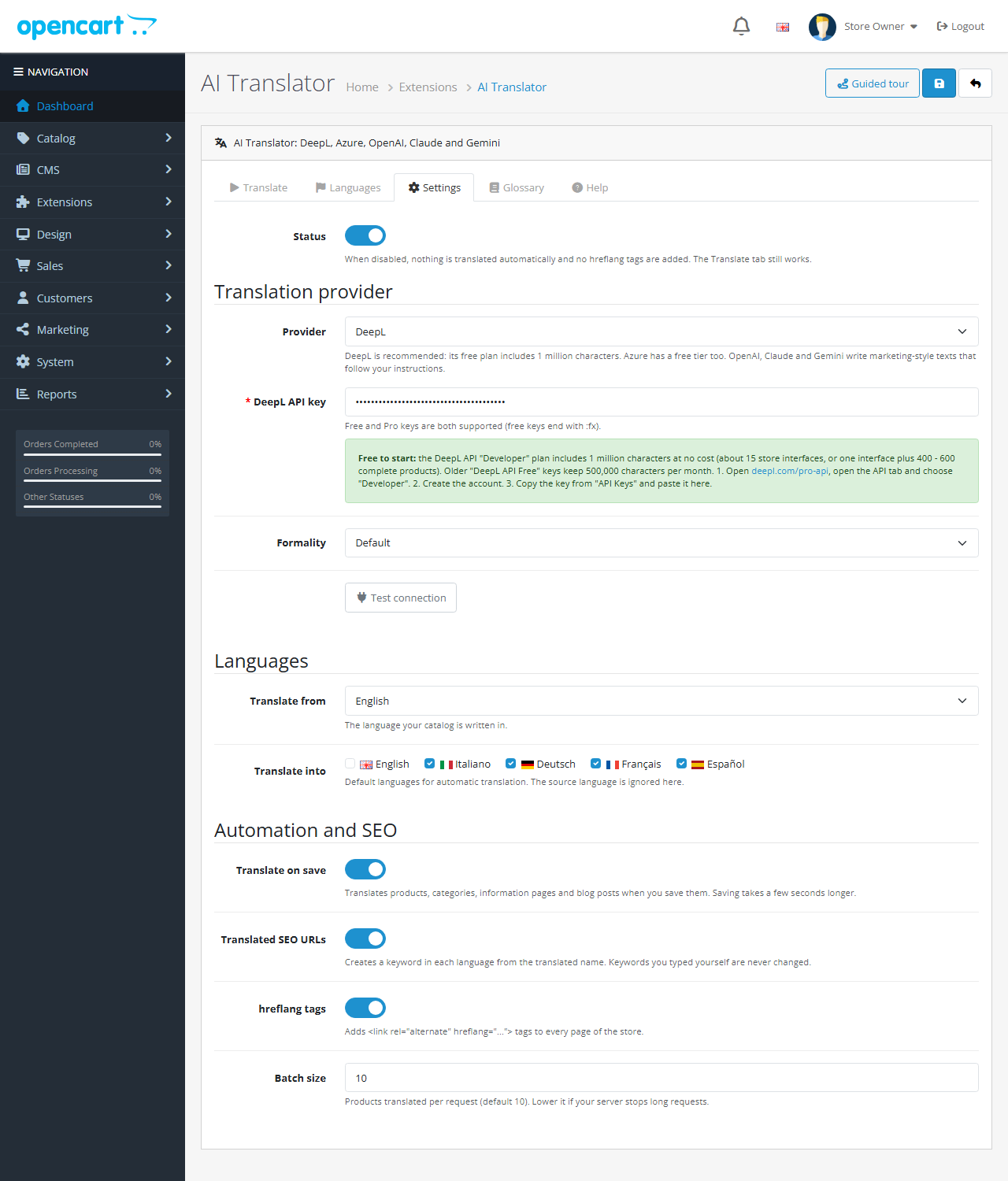
Add a new language
- Open the Languages tab, choose the language (33 available, right-to-left included) and click Create and translate.
- AI Translator creates the language in OpenCart (flag, locale, date and number formats) and translates every interface text: buttons, cart, checkout, account, e-mails, your theme and all installed extensions. Tick "Also translate the admin panel" if you want the back office too.
- At 100% the language is enabled. Then translate your catalog from the Translate tab.
Complete texts fills the gaps of any language, also the ones you installed yourself: a new theme or extension with English texts only, or new texts after an OpenCart update. Files written by people or other vendors are never modified: only missing files are created.
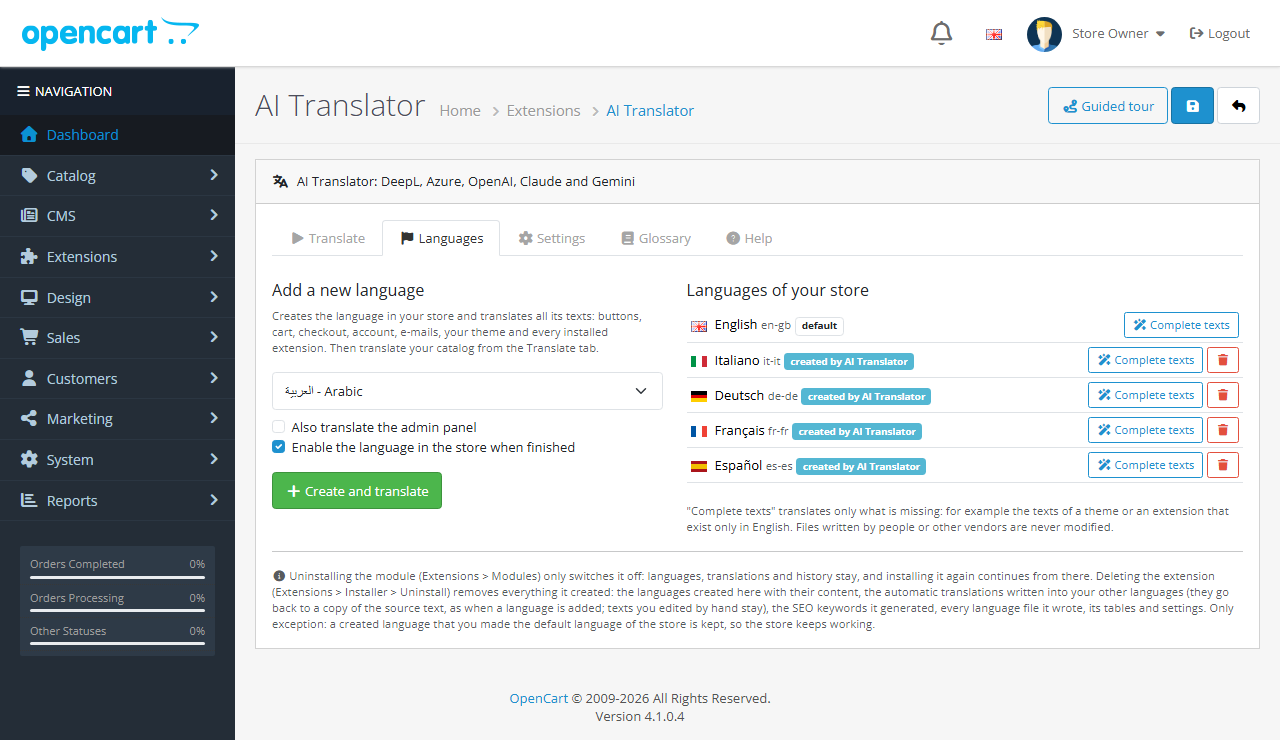
Translate the catalog
- In the Translate tab tick what to translate and the languages. Keep "Only what is missing or changed".
- Click Estimate cost to see the characters and the approximate price.
- Click Start translation and keep the page open until 100%. You can stop and restart at any time: you never pay twice for the same text.
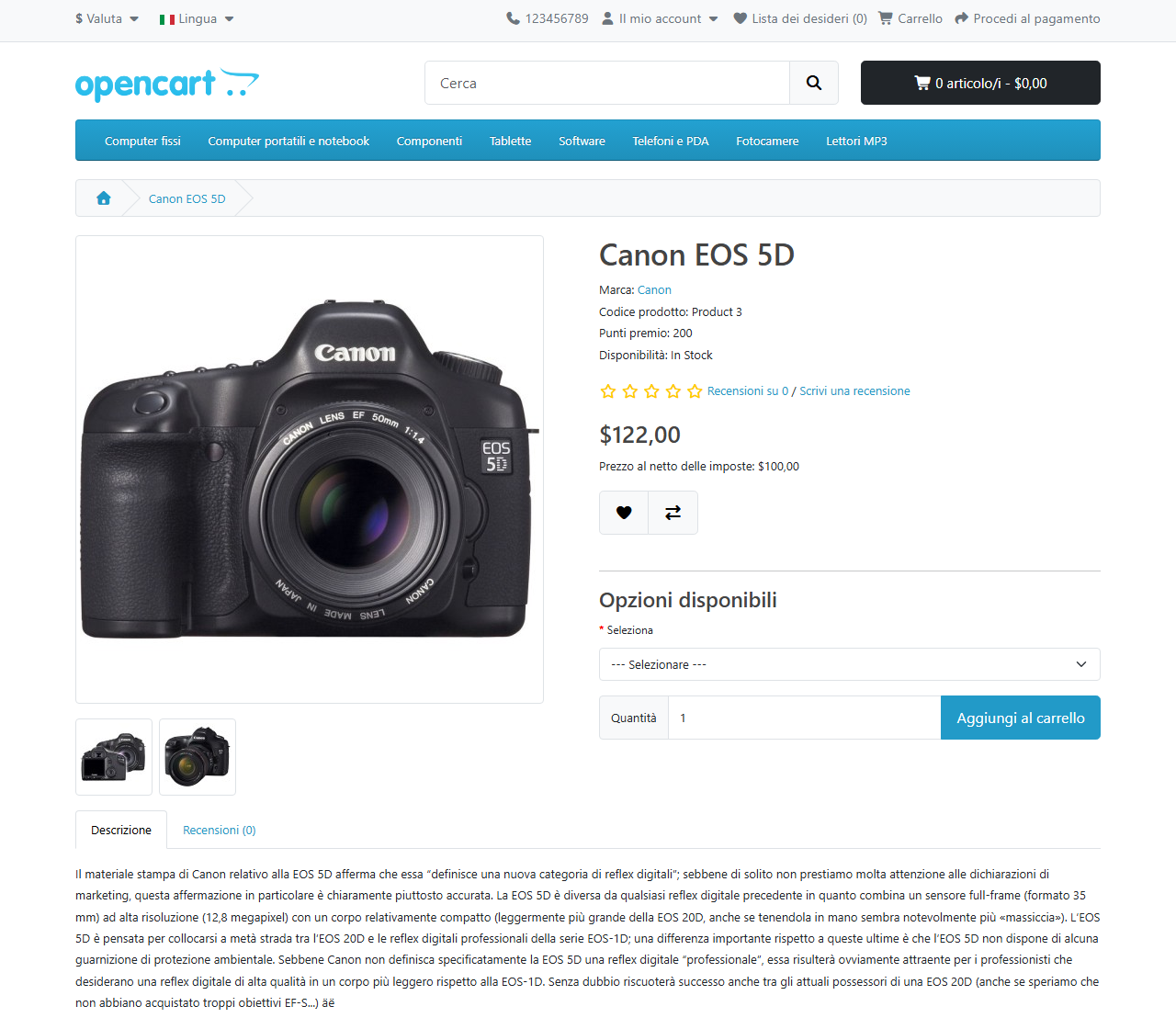
Translated content: products (name, description, tags, meta title, meta description, meta keywords), categories, information pages, attributes and groups, product attribute values, options and values, filters and groups, blog topics and articles (OpenCart 4). HTML is preserved.
With Translate on save enabled, products, categories, information pages and articles are translated automatically every time you save them.
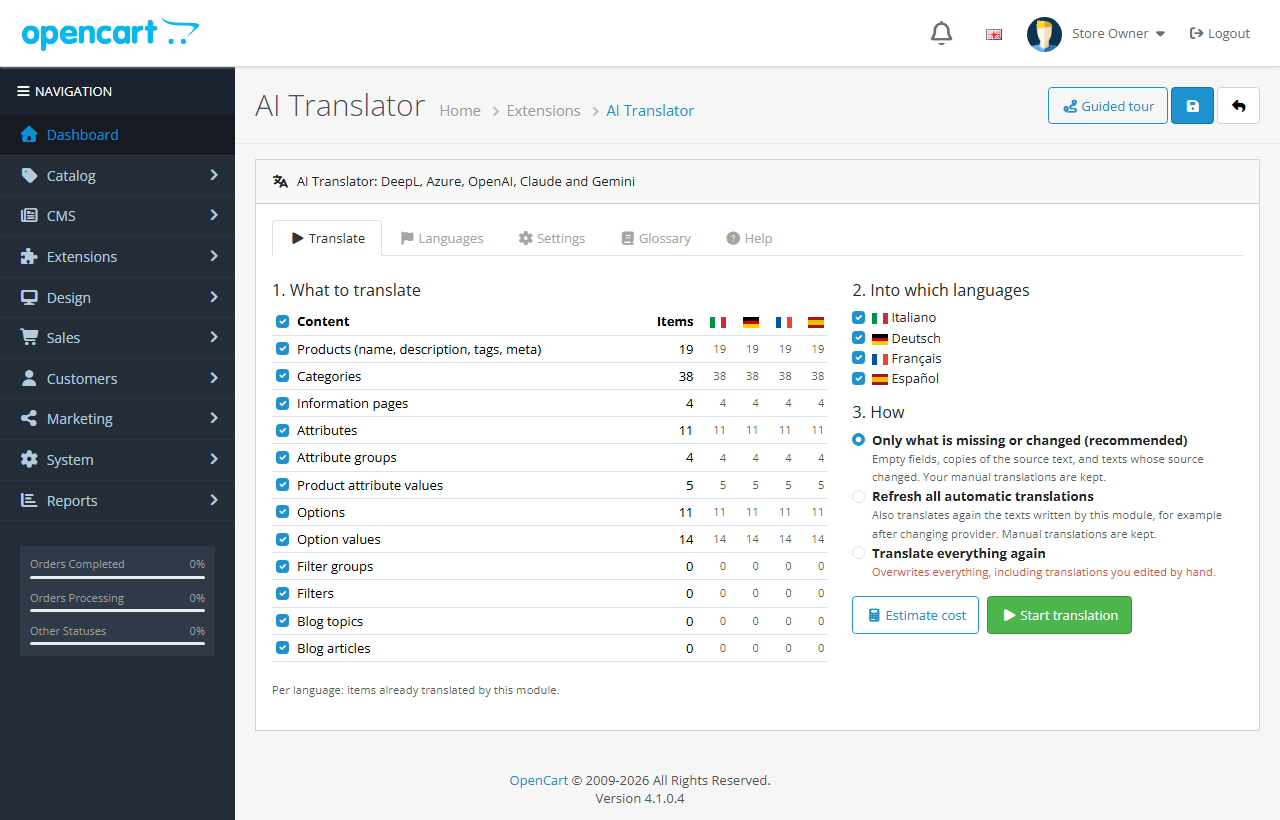
Settings
| Setting | What it does |
|---|---|
| Status | Off: nothing is translated automatically and no hreflang tags are added. The Translate tab still works. |
| Provider, key, model | Which service translates and with which account. |
| Formality (DeepL) | Formal or informal form where the language has one. |
| Instructions (OpenAI, Claude, Gemini) | Tone, audience, words to prefer. |
| Translate from / into | The language your catalog is written in, and the default target languages. |
| Translate on save | Translates items when you save them. |
| Translated SEO URLs | Creates an SEO keyword in each language from the translated name. |
| hreflang tags | Adds alternate links for every language (OpenCart 4). |
| Batch size | Items per request. Lower it if your server stops long requests. |
Glossary
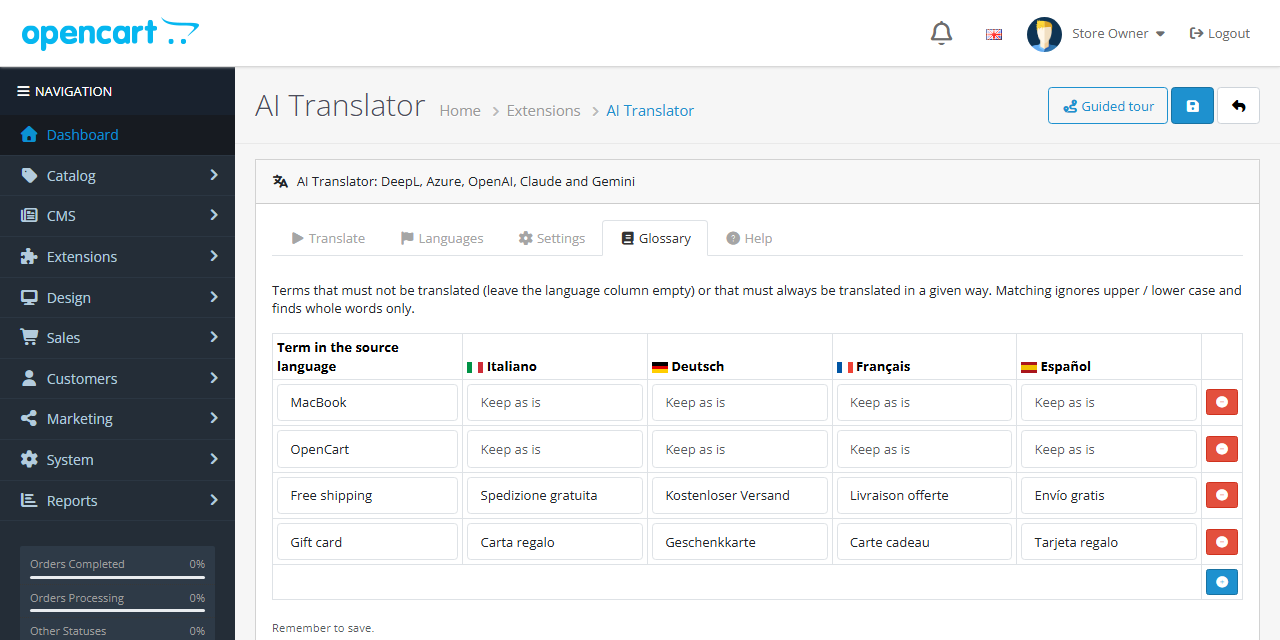
Terms that must never be translated (brand and model names: leave the language column empty) or that must always be translated in a given way. Matching ignores upper and lower case and finds whole words only.
SEO and hreflang
- SEO keywords are created in every language from the translated name, unique per store, with the translated parent path for sub-categories (OpenCart 4):
/it-it/scarpe-da-corsa,/fr-fr/chaussures-de-course. - SEO keywords you typed yourself are never changed.
- On OpenCart 4, every public page gets
<link rel="alternate" hreflang="...">tags for each language, plusx-default, so Google shows each customer the right language.
Your content is safe
- The source language is never modified.
- A field is translated only if it is empty, still identical to the source text, or its source changed after a previous automatic translation.
- If you edit a translation by hand, AI Translator notices it and never overwrites it (unless you choose "Translate everything again").
- Placeholders in interface texts (
%s,{name}) are protected; if a translation loses one, the English text is kept. - No core file is modified: the extension works only with OpenCart events.
Deactivate or delete
Deactivate: Extensions > Extensions > Modules > AI Translator > Uninstall (red -). The automatic features stop; languages, translations and history stay, and installing the module again continues where you left off.
Delete removes everything the extension created:
- OpenCart 4: first deactivate the module, then Extensions > Installer > Uninstall next to AI Translator.
- OpenCart 3: Extensions > Installer > history > Uninstall next to
ai_translator.ocmod.zip.
Deleting removes the languages created by AI Translator with all their content, the automatic translations written into your other languages (each field goes back to a copy of the source text, as when a language is added; texts you edited by hand stay), the SEO keywords it generated, every language file it wrote, its tables, settings, events and permissions.
Troubleshooting
| Message or problem | Solution |
|---|---|
| Invalid API key | Copy the key again, without spaces. DeepL free keys end with :fx. |
| Quota exceeded / 429 | Your provider plan limit was reached, or too many requests: wait or upgrade the plan. |
| Response was cut off / timeouts | Settings > Batch size: try 3 or 5. |
| SSL certificate problem | Update to the latest version: a trusted certificate list is included for servers (often Windows hosting) whose PHP has none. The error message lists what was tried. |
| Folder is not writable | Give the web server write permission on the folder shown in the message. |
| Nothing to translate | The texts are already translated or were edited by hand. Use "Refresh all automatic translations" or "Translate everything again". |
| SEO URLs not shown in the store | System > Settings > Server > Use SEO URLs = Yes, and rename .htaccess.txt to .htaccess (Apache). |
Errors during "translate on save" never block saving: they are written to System > Maintenance > Error Logs.
Changelog
1.1.0
- New: language generator (33 languages) with translation of the store, optionally the admin, themes and extensions.
- New: "Complete texts" for any language.
- New providers: Microsoft Azure Translator and Google Gemini.
- New: guided tour of every feature.
- New: clean removal. Deleting the extension removes everything it created.
- Windows hosting supported (certificate list included), PHP 8.1 - 8.5.
- The key test works even when the store has only one language.
- The store cache is cleared after each translation, so new texts show up at once.
1.0.0
- First release: DeepL, OpenAI and Claude; products, categories, information pages, attributes, options, filters, blog; SEO URLs, hreflang, glossary, translate on save, cost estimate.
Guides
- How to make your OpenCart store multilingual
- How to add a new language to OpenCart 4
- Translate OpenCart products for free with the DeepL API
- OpenCart hreflang and translated SEO URLs
- In Italiano: Come rendere multilingua un negozio OpenCart
More OpenCart extensions on ringaedor.com.
Support
Buy it on the OpenCart Marketplace. 12 months of support and updates are included. Write to support_ai_translator@ringaedor.com with your OpenCart version, PHP version and the error message. Questions before buying are welcome too.